
VESPID SERIES
Back Focus Adjustment Tutorial
Every Vespid Cyber digital lens will process flange back adjustment on standard before shipping. The flange distance of different cameras may be slightly different, resulting in inaccurate scales. To achieve the best performance and match different cameras, flange back adjustment is needed.
1.Preparation
Take Vespid Cyber 35mm as an example:
Step One :Ready your subject. You can use a "Star Chart", or other high-reso lution black-and-white objects;download the "Back Focus Calibration Tool for Prime Lens"(Click to jump to the website) on the offificial website.
Note : You can download and print the chart on DZOFILM website for Adjusting Back Flange(Click to jump to the website)
Step Two :Attach the lens to the camera and adjust the aperture to T4;
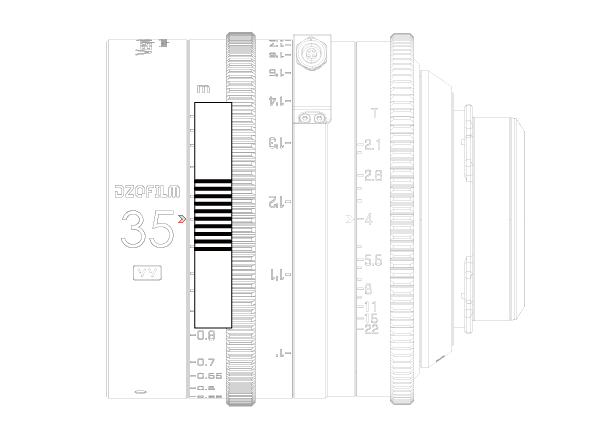
Step Three :Make the pointer align with the1.6m scale on focusing ring, pastecalibration tool on the ring with middle line of the tool aligning the1.6m scale and the scale pointer (or choose other focusing distance and corresponding scale).
Step Four : Set the object 1.6m away from the camera sensor plane, and adjust it to the center of the whole image.
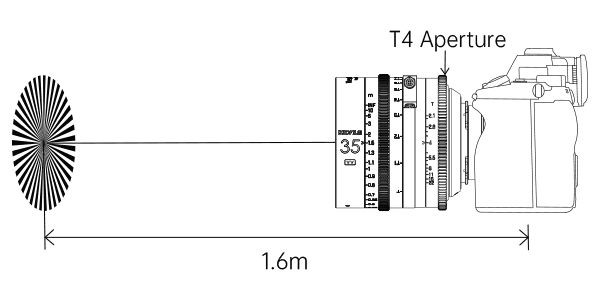
Set the object 1.6m away from the camera sensor plane, and adjust it to the center of the whole image.
2.Flange Back Adjustment Please adjust as the following steps:
Step One :Rotate the focus ring until the image to its clearest. Take the horizontal line in the middle of thecalibration tool as the reference and observe the position of the deviating scale pointer to get the number of horizontal lines.
Note: The direction ofinfifinity indicatespositive deviation value. The direction of theclosest focusing distance indicatesnegative deviation value. If there are more than fifive horizontal lines, add or subtract the corresponding value.
Example: :If the scale pointer points to 5 spaces in the direction of the closest focusing distance, the deviation value is -5.
If the scale pointer points to 5 spaces in the direction of infifinity, the deviation value is +5. At this situation, the shim value of "+4" needs to be added to the
shim value of "+1".
Step Two :According to the deviation value and the reference below, add or subtract the corresponding shim to complete the flflange back adjustment.
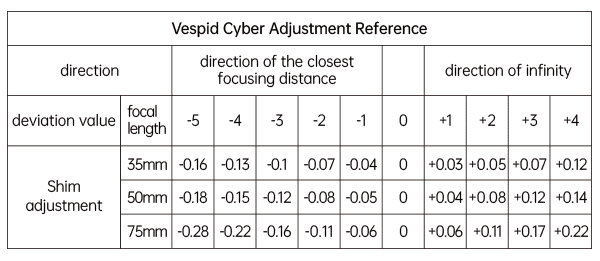
Note: Shim adjustment: "+"meansadding shims, and"-" decreasing shims